
MOST TEAMS TREAT COLD EMAIL LIKE Direct mail
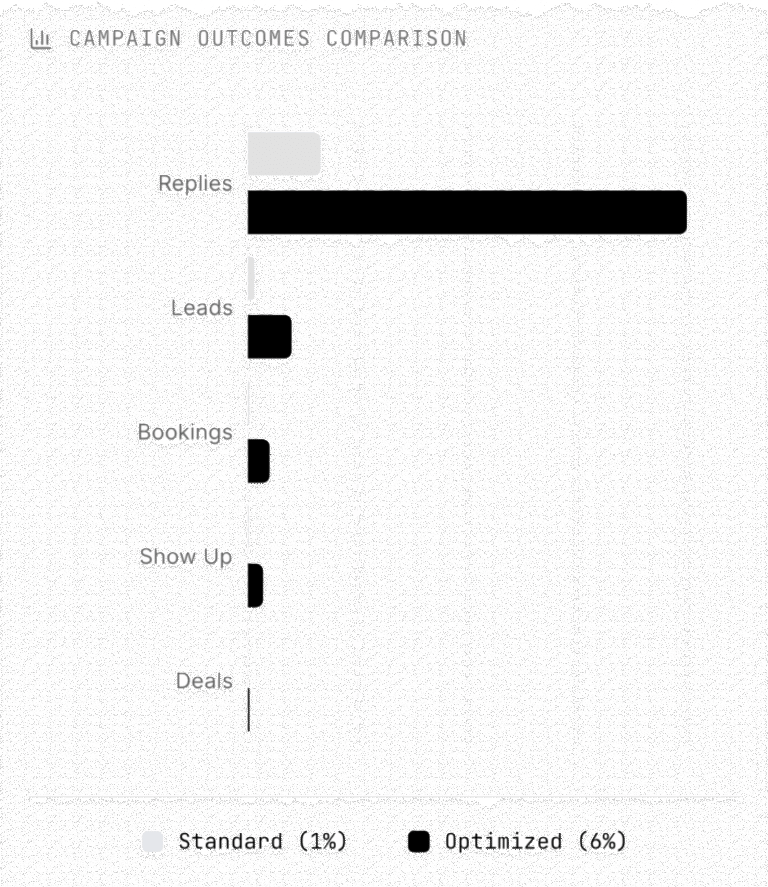
Most teams treat cold email like direct mail: same message, different names, pray for 1% response rates.
0.1-1%
3-6%
THE MATHEMATICS OF GROWTH
1. WHY REPLY RATE IS THE HOLY GRAIL
Let’s say you’re decent at cold email and you send 50,000 emails/month
- 1% reply rate = 500 replies
- 10% of those are positive = 50 leads
- 30% book meetings = 15 bookings
- 70% show up = 11 meetings
- 20% close = 2 deals
Now bump that reply rate to 3%:
1,500 replies → 150 leads → 50 bookings → 35 show up → 6 deals.
Now bump that reply rate to 6%:
3,000 replies → 300 leads → 150 bookings → 105 show up → 12 deals.
I think you get where I’m going with this… One small change = 6x more revenue.
Domain Health
- HEALTHY
Safe, human-like sender. Lands in Primary Inbox.
- UNHEALTHY
Spammy sender. Lands in Junk or Blocked entirely.
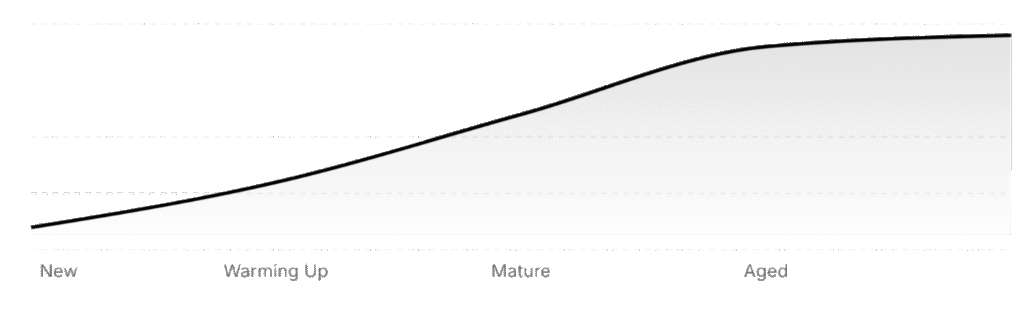
Domain Age vs Forgiveness
3. DOMAIN HEALTH
What is domain health? It’s how email providers categorize your domain:
Healthy = safe, human-like sender → inbox.
Unhealthy = spammy sender → junk folder or worse, blocked entirely.
What wrecks domain health?
- Sending too many emails too fast
- Copy-pasting generic, spammy messaging
- Not running spintax
- Sending spammy worded emails
- Sending links, images, HTML in your copy
- Targeting bad or unverified leads
- Re-running the same list too soon
- Running a campaign too long past its burn point
- Using trash SMTP inboxes
Want to protect your domain rep? Follow this checklist:
- Use high quality inboxes, Google or Outlook not SMTP (more on this later)
- Start slow and follow ESP advisory sending tables.
- Use human-like, personalized
- copy
Segment your lead lists rather than doing jargon AI personalization. - Verify every lead before sending
- Rotate fresh lists every 90 days
- Don’t cheap out on a bad warmup pool
3.1 DOMAIN AGE
Does it Matter? Yes, but not like you think.
Aged domains aren’t better out of the box. They don’t magically hit inboxes.
What they do offer is forgiveness.
Older domains have baked-in reputation, so they recover faster if you screw up.
Bottom line: Clean sending > domain age. Aged just buys you more room to mess up without burning it all down.
4. EMAIL SERVER HEALTH
You can’t fix a cooked server. Period.
Google and Outlook have industrial-grade, battle-tested infrastructure. Bulletproof rep. High trust across ESPs. And here’s the kicker: you can get real Google and Outlook inboxes for dirt cheap.
1:1 the same as standard accounts. Even US/EU IP options if you know where to look.
SMTP? Not so much. It’s a never-ending cycle:
- You warm it up for weeks
- You get flagged after one bad send
- You start over
Moral of the story:
Pay for real inboxes (Google Workspace, Outlook)
Don’t DIY infra unless you know what you’re doing
Treat inbox selection like you’d treat your CRM or payment stack foundational, not flexible
Avoid shared SMTPs like the plague.
Know what IP you’re on. Know what platform you’re using. And know when to reroll if your rep is toast.
5. CAMPAIGNS
Infra gets you in the inbox. Campaigns get you replies.
The best campaigns align 4 layers:
- Right person
- Right timing
- Right problem
- Right proof
Miss any one, and your reply rate tanks.
Let’s break down each lever:
Step 1: List Quality > Everything
Your list controls everything downstream. You cannot write good copy to a bad list.
Most people just filter Apollo by job title.
Top performers build hyper-targeted lists by:
- Scraping niche databases (Pitchbook, Crunchbase, LinkedIn with filters, Serper.dev)
- Stacking data from tools like Clay and Ocean
- Mining Reddit, Crunchbase newsfeeds, SEC filingsTracking job posts, hiring surges, new feature launches
- And most importantly local directories for your ICP.
Step 2: Segmentation = Relevance Multiplier
Segmenting lets you write emails that feel personal at scale.
You can slice by:
- Industry sub-niches (fintech SaaS vs martech SaaS)
- Team size or stage (bootstrapped vs PE-backed)
- Tech stack (Hubspot vs Salesforce vs no CRM)
- Recent moves (new exec, opened new office, acquisition)
- Role (CEO vs Ops vs Growth
- Lead each has different metrics they care about)
- Funding stage (seed vs Series B has drastically different budgets, timelines, risk profiles)
- Behavioral triggers (hiring, running ads, switching tools, posting a job)
Use those details in:
First lines (“saw you just onboarded [TOOL]”)
Proof points (“helped [COMPETITOR] increase retention 19%”)
CTAs (“worth showing you how we did this for [PEER]?”)
Example: “Fintech ops leads at Series A companies who just raised and are hiring SDRs.” Start campaigns with just 1-2 of these deep segments.
Step 3: Validate Like a Pro
If you’re sending junk data, your whole campaign’s dead on arrival.
Doesn’t matter how good the copy is.
Most people just skip validation or rely on a single tool.
Tools to Use:
- Omniverifier (cheap + reliable)
- NeverBounce or Bouncer (for non-catchalls)
Test small batches. Watch bounce rates tightly
Step 4: Copy That Doesn’t Suck
Spam filters don’t speak English.
They vectorize your message breaking it down into data patterns to predict if it’s spam.
What triggers spam:
- Overused words (“free,” “guarantee,” “buy now”)
- Repetitive structure (5-line pitch blocks)
- Common cold email phrases (“just following up”)
- Lack of variability (same phrasing across 1,000s of sends)
Your job is to make the email look and feel unique like a one-off human note.
How to beat the filter:
- No more than 1–2 “spammy” words max
- Vary sentence structure across templates
- Avoid bullets, formatting, and bold text
- Keep it casual, plain-text style
Use a free spam tester like Mailmeteor’s before sending - Forget fancy. Be direct, specific, and useful.
Examples:
“Saw [COMPANY] just expanded into LATAM. Helped [X] scale to 4 reps in 30 days there. Want the playbook?”
“Noticed [COMPANY] started running ads again. We help brands drop CAC 18-22% using non-obvious list builds. Worth a quick chat?”
Bonus: keep it 40-60 words max. Shorter if you’re sending to Outlook. Offer swipe files and explained in a lot more detail: 5 Offer Creation
Step 5: Use CTAs That Actually Get Replies
You’re not selling. You’re starting a convo.
CTAs that work:
- “Want me to send the [case study | resource | video | document]?”
- “Should I send the teardown?”
- “Worth seeing if this fits [COMPANY]?”
One ask. One step. That’s it.
Step 6: Real Proof or Get Ignored
Social proof isn’t optional anymore.
Use this format:
- Company name
- Outcome
- Speed or timeframe
Bad: “We helped companies grow.”
Good: “Helped [X] add $78k MRR from cold emails in 19 days.”
6. FOLLOWUP OR DIE.
Most campaigns die because people don’t follow up. Or worse they just send “bumping this” and hope for the best.
General Rules:
- Send at least 3-5 follow-ups per lead (7 ideally)
- Space them 2-4 business days apart
- Each follow-up must add value, not noise
Follow-Up Frameworks:
Add Proof: “Following up on my last. Helped [PEER COMPANY] close $48k in MRR with this.”
New Angle: “Another reason this works: drops CAC 20% by replacing X.”
Quick Reminder: “Built this with [COMPANY] in mind. Still want me to send it?”
Cliffhanger: “Have a teardown we did for [COMPETITOR]. Want a peek?”
Direct Ask: “Should I close this loop or does this sound useful?”
30-40% of replies come from follow-ups. Don’t phone it in.
7. ESP-SPECIFIC PLAYBOOK (Outlook vs Google)
Outlook-Specific Warmup + Sending Strategy
Outlook has the strictest AI spam filters on the market right now. Even Microsoft’s own emails sometimes land in spam.
Outlook inboxes are either good from the get go or they need their IP to be rerolled.
Never run ESP matching with Outlook, it amplifies the spam rate on their end and it will burn your inboxes.
Here’s how to not get burned:
Warmup Settings (for Outlook inboxes):
- Total warmup emails/day: 5
- Daily ramp-up: 2
- Reply rate: 30%
- Randomization: 2-5 (if supported)
- Let inboxes warm for at least 3 days, ideally 10-14 before sending cold
Sending Settings:
- Max 3–5 cold emails/day per inbox
- Minimum 61-minute gap between sends
- Campaign Configuration Musts:
- No open tracking (kills inbox rate instantly)
- No links in body copy
- Use spintax: every 2-3 words randomized, especially signature (use https://sp1n.me or GPT-powered generators)
- NEVER send to “Bad” or “Risky” leads use MillionVerifier or Scrubby (no BounceBan)
Copy for Outlook:
- 1-liner, max 50 words
- As casual as possible
- No dollar signs or financial language
- Avoid common spam phrasing (“free trial,” “just checking”)
List Management:
- Split lists by ESP using Emailguard’s host lookup
- Run separate campaigns: Outlook vs Google
- Outlook Red Flags (Smartlead Specific):
- If “Flaggable” in Smartlead: copy was too spammy, email didn’t send
- Outlook checks messages BEFORE delivery. If it smells like spam, they stop it at the gate
- If IP is blacklisted, request a reroll from Microsoft support (15-day change cycle)
General Infra Advice:
- Diversify: 40% Outlook, 40% Google, 20% Private SMTP (if needed)
- Don’t use private SMTP for cold bad IPs, harder to recover
- Use tools like Mailreef if you need dedicated inboxes
- Cloudflare is best for storing domains (privacy + rep protection)
Avoid:
- Domain forwarding (bad for reputation) instead just duplicate your website onto those domains as well.
- Link spamming
- High-volume spikes (volume ramping must be natural and varied)
8. SUBJECT LINES
Subject lines are the first inbox filter but not the most important.
Don’t optimize for opens.
Optimize for relevance and please stop using “Quick question [firstname]”.
What works:
- Feels personal, not promotional
- Sounds like something you’d email a friend
- No title-case or gimmicks
Best performers:
“more MQL?”
“yes/no”
“Less churn?”
“Need this?”
“idea, [firstname]”
“[first name] hiring help?”
“ops hire still open?”
“saw this re: [competitor]”